
The POS Sell Page is used to create orders at the point of sale. Staff can search products, select customers, apply coupons, and process payments.
Key Features: #
- Products & Filter: Select store, search for products by name.
- Billing: Add customer or select an existing one, manage cart items.
- Coupon: Apply discount codes directly to the order.
- Payment Methods: Process payment via Cash, Card, or Wallet.
- Order Actions: Place order or clear the cart.

Example of POS Sell Page with product selection, billing, and payment options.
Orders
#
The POS Orders section lists all orders created via the POS system. Admins can search, filter, and view detailed order information.
Key Features: #
- Search: Filter orders by order ID, invoice number, payment status, or date range.
- Order Details: View customer info, store, amount, payment status, and delivery status.
- Actions: Edit or view order details as required.
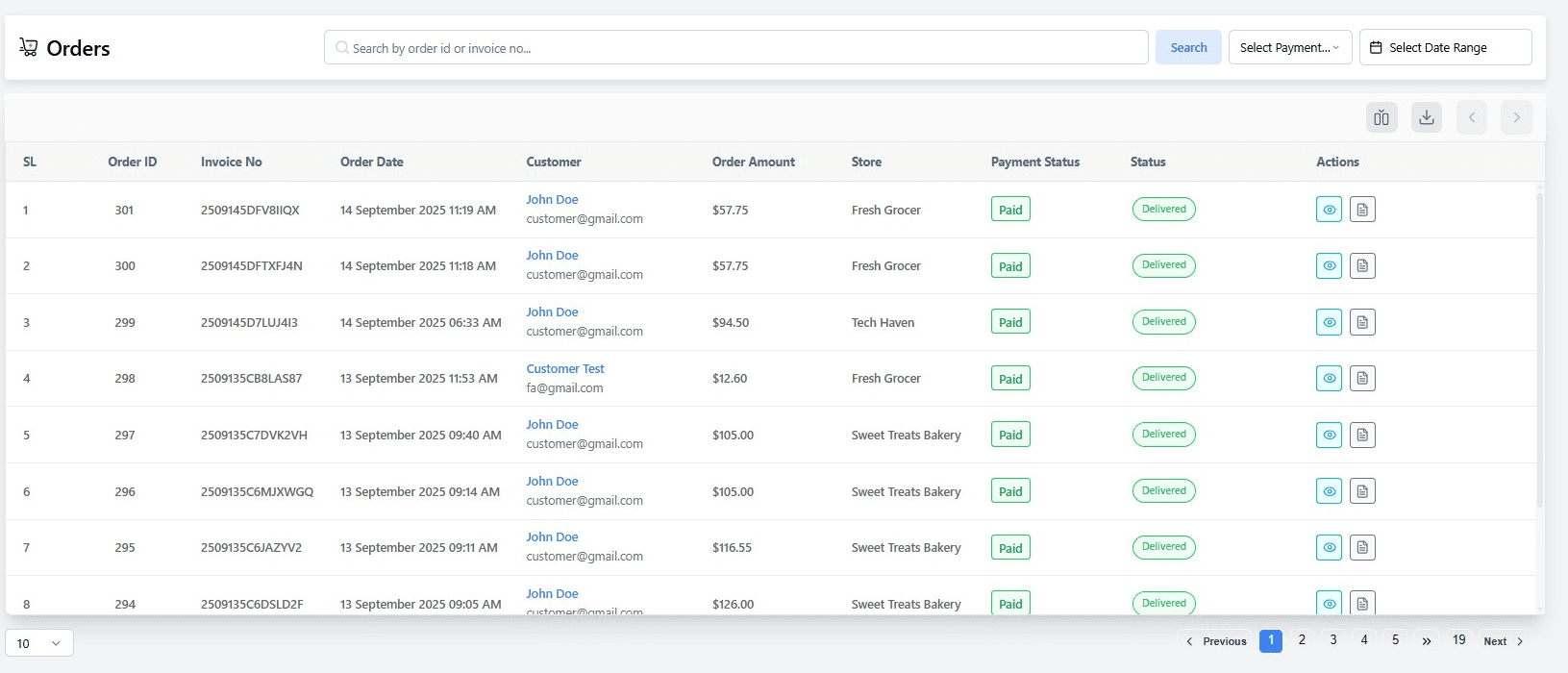
Example of POS Orders list showing order ID, invoice, customer, payment, and status.
Settings #
The POS Settings allow configuration of POS-related preferences, such as printer type and other store-specific POS options.
Key Options: #
- Printer Type: Select the type of receipt printer used for POS billing.
- Save Changes: Save the configured POS preferences.


