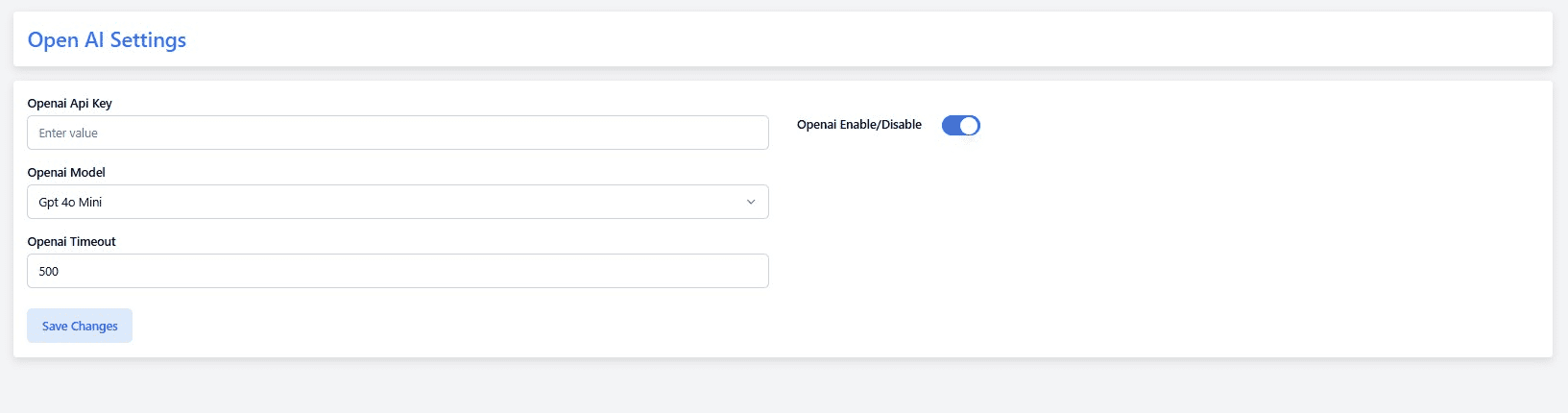
Configure OpenAI to power AI-based features in your platform, such as content generation, smart replies, or intelligent recommendations. Manage your API key, model, and request options easily.
To Configure #
- Go to Admin Panel → System Management → Third-Party → OpenAI Settings
- Enter your OpenAI API Key (from the OpenAI Dashboard).
- Select the OpenAI Model:
- GPT-4o Mini
- Other supported models (if enabled in your system)
- Set the Timeout (in seconds, e.g.,
500) for API responses. - Toggle Enable OpenAI to ON and click Save Changes.
Notes #
- Your API Key must be active and have sufficient credits in OpenAI.
- Make sure to use a model supported by your subscription (e.g., GPT-4o Mini for faster, cheaper responses).
- Timeout value determines how long the system will wait for OpenAI before cancelling the request.
- After saving, test AI-powered features to confirm they respond correctly.